
TL;DR
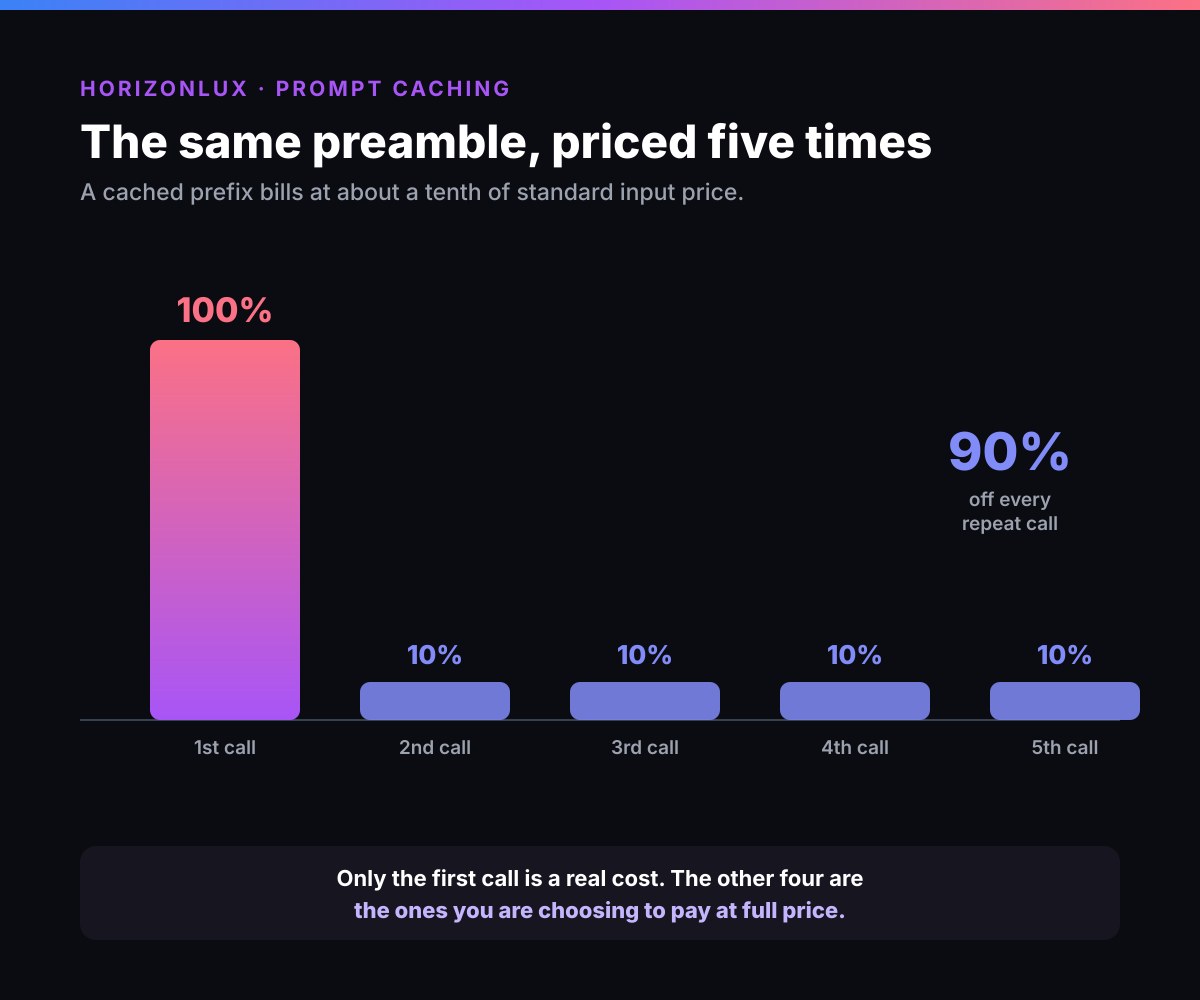
Prompt caching stores the model's internal computation for the fixed prefix of your prompt, the system instructions, tool definitions and reference documents that repeat on every call, so you stop paying full price to re-process tokens the model has already seen. Cached tokens bill at roughly 10% of the standard input price across the major providers, a 90% discount on the repeated portion, and time-to-first-token drops by up to 80%.
The catch: some providers charge a write premium (Anthropic and GPT-5.6 add 1.25x on a cache write, 2x for a one-hour cache), so caching only pays off once enough requests read the cache to clear that premium, break-even lands around a 22% hit rate. Below it, caching costs more than not caching.
This guide covers what prompt caching is, exactly what each provider charges, the break-even math, when it backfires, and the one mistake that quietly drops your hit rate to zero. There's a prompt caching calculator to size the saving on your own numbers.
Paying frontier prices for tokens you've already sent? Our AI development work starts by instrumenting where the spend actually goes.
Key Takeaways
- Prompt caching bills the repeated prefix of a prompt at about 10% of the standard input price.
- The prefix must be byte-identical across requests to hit the cache; the variable user message sits at the end and is never cached.
- Providers with a write premium (Anthropic 1.25x, GPT-5.6 1.25x) need roughly a 22% hit rate to break even; DeepSeek and Gemini implicit caching save from the first read.
- The default cache lifetime is short, 5 minutes on Anthropic, so infrequent or slow traffic re-pays the write premium every call.
- The most common failure is a timestamp or session ID buried in the prefix, which changes the hash and forces a fresh write on every request.
- Real production teams report 49% to 80% token-cost reductions with caching applied correctly.
What is prompt caching?
When you send a prompt to an LLM, the model processes every token through its attention layers, producing an internal representation (the key-value, or KV, tensors) of your input. That computation is most of the cost and latency of a request. Prompt caching stores those KV tensors for a stable prompt prefix, so when a later request starts with the same prefix, the model skips the re-computation and picks up where it left off, like a bookmark, instead of re-reading from page one every time.
The output is unchanged. The model still generates a fresh, non-deterministic response; caching only affects the processing of input tokens you have already sent before. Two identical requests with cached prefixes will still produce different outputs.
That distinction matters, because prompt caching is easy to confuse with things it is not.
Prompt caching, context caching, prefix caching, KV cache: same idea, different names
Different vendors and different layers of the stack use different words for the same trick, and the inconsistency is a real source of confusion when you are reading across provider docs.
- Prompt caching is Anthropic's and OpenAI's term for the feature this whole guide covers.
- Context caching is Google's name for the identical technique on Gemini. Google's own docs say "context caching" in exactly the place Anthropic and OpenAI say "prompt caching." Same mechanism, different label.
- Prefix caching is the infrastructure-level term, used by serving engines like vLLM and inside Bedrock's own documentation, for caching the shared prefix across a batch of requests, the same idea one layer down from the API-level feature you actually call.
- KV cache (key-value cache) is the thing being stored: the attention layer's key and value tensors, computed once per token. Every feature above, whatever a vendor calls it, is a way of reusing an already-computed KV cache instead of paying to recompute it. KV cache is the mechanism; prompt caching, context caching and prefix caching are three product names wrapped around that same mechanism.
Search any of these four terms and you land on documentation for the same underlying feature under a different name. This guide says "prompt caching" throughout because it is Anthropic's and OpenAI's term and their combined share makes it the most common label, but the pricing table below and every implementation note apply regardless of which name your provider uses.
How prompt caching works
Every major provider implements the same core idea with small differences:
- You mark (or the provider auto-detects) a cacheable prefix. On OpenAI and Gemini implicit caching this is automatic for prompts over ~1,024 tokens; on Anthropic and Bedrock you place explicit
cache_controlbreakpoints. - First request, a cache write. The model processes the full prompt and stores the KV tensors for the prefix, keyed by a hash of its contents.
- Later requests, a cache read. If the prefix hash matches, the model reads the stored tensors and only processes the new tokens at the end. Those cached tokens bill at the discounted read rate.
- Expiry. Caches are ephemeral. After the time-to-live (TTL) elapses with no hits, the entry is dropped and the next request pays to write it again.
The rule that governs all of it: cache hits require an exact prefix match. Change one token anywhere before your breakpoint and the hash changes, the cache misses, and you pay to re-process everything.
What prompt caching is NOT
Misconceptions cause more wasted spend than ignorance does. Prompt caching is:
- Not response caching. It does not store and replay a previous answer. It stores internal computation; the model generates a fresh response every time.
- Not semantic caching. It does not match "close enough" prompts by meaning. It requires an exact prefix match, one changed character misses.
- Not fine-tuning. No weights are modified. It is a pure inference optimization; the model behaves identically whether the cache hits or misses.
- Not persistent. Caches expire in minutes to an hour. No traffic, no cache.
- Not faster generation. Caching cuts time to first token, sometimes dramatically, because the prefill work is skipped. Tokens per second during generation are unchanged. The answer starts sooner and then streams at exactly the same speed.
- Not automatic savings. Below a provider's minimum token threshold (usually 1,024) caching does not activate at all, and with a write premium it can cost more than it saves.
Prompt caching pricing, by provider
Read pricing is remarkably consistent, about a 90% discount, but the write premium and the defaults differ, and those differences decide whether caching helps you.
| Provider | Cache write | Cache read | Default TTL | Notes |
|---|---|---|---|---|
| Anthropic (Claude) | 1.25x base (5-min), 2x base (1-hour) | 0.1x base (90% off) | 5 min (1-hour optional) | Explicit breakpoints, up to 4; minimum varies by model, see below |
| OpenAI (GPT-5.6+) | 1.25x base | 0.1x base (90% off) | 30 min minimum | Explicit breakpoints; automatic for 1,024+ tokens |
| OpenAI (GPT-4o / pre-5.6) | No write fee | ~0.5x base (50% off) | 5-10 min | Fully automatic, no code changes |
| Google Gemini (implicit) | No write fee | ~0.25x base (75% off) | automatic | On by default; input price steps up past 200K context |
| Google Gemini (explicit) | No write fee (+ storage) | up to 0.1x base (90% off) | configurable | Named caches with a set TTL |
| DeepSeek | No write fee | ~0.1x base (90% off) | automatic | Caches in 64-token chunks; no threshold |
| Amazon Bedrock | Per model (often higher) | Discounted | 5 min (1-hour on some) | Per-model minimums; see the Bedrock docs |
One pricing behaviour worth reading alongside this table, because it fires in exactly the situations caching is meant to help: Gemini charges a higher input rate once a request passes roughly 200,000 tokens of context, close to double above that line. Every other provider here bills one input price regardless of length. So on Gemini a long-context workload can cross a price step that never appears in the headline rate, and it crosses it precisely when a growing conversation or an oversized retrieval pushes context up. Caching discounts the tokens; it does not move the threshold.
Anthropic's own published multipliers make the structure concrete: a 5-minute cache write costs 1.25x the base input price, a 1-hour write costs 2x, and every read costs 0.1x. On Claude Sonnet at $3 per million input tokens, that is $3.75 to write and $0.30 to read. How these differences play out against real traffic, including the volume where each provider's caching starts paying, is worked through in how to cut your OpenAI or Anthropic bill.
The minimum nobody checks
Caching does not activate below a per-model token threshold, and no error is returned when it fails. Your request succeeds, your prompt is processed at full price, and nothing in the response says caching was skipped.
Anthropic prompt caching thresholds are not uniform, and they are not intuitive:
| Claude model | Minimum tokens to cache |
|---|---|
| Opus 5, Fable 5, Mythos 5 | 512 |
| Opus 4.8, Sonnet 5, Sonnet 4.6, Sonnet 4.5 | 1,024 |
| Opus 4.7 | 2,048 |
| Opus 4.6, Opus 4.5, Haiku 4.5 | 4,096 |
Read that last row again. Haiku 4.5, the cheap routing tier, has the highest minimum on the list, eight times that of Opus 5. That interaction catches teams who applied two of our levers at once: route the high-volume work to a small model, then cache the stable prefix. If your prefix is 2,000 tokens, caching was working on the frontier model and silently stopped working the moment you routed to Haiku. The bill goes down, but by less than you calculated, and nothing tells you why.
Amazon Bedrock applies its own per-model minimums, which do not always match the direct API, and its own syntax and invalidation rules; the full implementation guide is in Bedrock prompt caching. On Bedrock, Claude Opus 4.5, Opus 4.6, Sonnet 4.5 and Haiku 4.5 all require 4,096 tokens per cache checkpoint, while Sonnet 4.6 and Claude 3.7 Sonnet require 1,024. OpenAI is simpler: 1,024 tokens across the board.
How to check in one line. Look at the usage fields in the response. On Anthropic, if cache_creation_input_tokens and cache_read_input_tokens are both zero, nothing was cached. On OpenAI, cached_tokens of zero on a prompt you believed was cacheable means the same thing. If your prefix falls just short of the threshold, padding it to reach the minimum is usually worth doing, since reads bill at a tenth.
Does prompt caching actually save money?
Usually a lot, but not always, and the difference is the write premium.
With no write fee (DeepSeek, older OpenAI, Gemini implicit), every read is pure savings and caching wins from the first hit. With a write premium, you need enough reads per write to clear it. The break-even math for a provider that charges 1.25x on writes and 0.1x on reads:
- Uncached, each request costs 1x the prefix price.
- Cached, at hit rate h, each request averages (1 – h) x 1.25 + h x 0.1.
- Those are equal at h ~ 22%. Above a 22% hit rate you save; below it you lose.
In practice most production workloads sit far above break-even, a chatbot or agent reusing the same system prompt hits the cache on nearly every turn. Real reported results: Thomson Reuters Labs cut cost 60% on classification workloads; LangChain's Deep Agents measured 49% to 80% reductions across Claude, GPT and Gemini on real agent trajectories. The saving grows the longer a conversation runs, because the cached prefix is reused on every turn.
Try it on your own numbers. Enter your prefix size, request rate and cache TTL below. It works out your reads per write, the monthly saving, and whether caching is even worth it at your traffic, for Anthropic, OpenAI, Gemini and DeepSeek.
Cache reads cost 10% of input. Caches prefixes of 512+ tokens. List price checked 30 Sep 2026 (source).
Writes cost 1.25x input. Each hit resets the 5-minute timer.
System prompt, tools, fixed docs. Must be identical every call.
The user's message. Never cached.
About 1,440 a day, one every 1 minutes on average.
Saving by traffic, for this prompt and cache
Caching pays above about 2.9 requests an hour.
requests per hour · the solid bar is your traffic
Assumes requests arrive at random through the hour and that each hit resets the cache timer, which is how Anthropic and OpenAI caches behave. Output tokens are not affected by caching and are left out.
When prompt caching does NOT help
Caching is not free money. It actively costs more in four cases:
- Highly dynamic prompts. If the whole prompt changes each request, hit rate is zero and, on a write-premium provider, you pay 1.25x on every call with no reads to offset it.
- Infrequent requests. Caches expire in 5 minutes (default). If your calls are further apart than the TTL, the cache is gone before the next one arrives, you pay the write every time and never collect a read.
- Short prompts. Below the ~1,024-token minimum, caching does not activate. There is nothing to optimize.
- One-shot interactions. A single request with no follow-up is one write and zero reads, a net loss where there is a write premium.
The honest rule of thumb: if more than half your input tokens repeat across requests, caching should be on. If you cannot say which parts of your prompt are stable, fix that before touching caching settings.
The TTL trap: why you might still be paying full price
The single most common way teams think they are caching but are not: the prefix changed, or the cache expired, and nobody noticed.
Two culprits dominate:
A dynamic element buried in the prefix. A timestamp, session ID, or rotating instruction sitting before your user message changes the prefix hash on every request. The cache never matches. You pay a fresh write each call and never see a read. The fix is structural, not a settings change: put every stable thing first (tools -> system prompt -> reference docs), and every variable thing, the timestamp, the user's message, last.
The TTL running out between calls. Anthropic's default cache lives 5 minutes, refreshed for free on each hit. In tools like Claude Code that means if you step away for more than five minutes, the whole conversation re-caches at full price on your next turn. If your calls are naturally spread out, switch to the 1-hour TTL (2x write, but worth it when reads are more than five minutes apart) or keep the cache warm.
This is why cache hit rate is the metric to watch, not whether caching is "enabled". Log cache_read_input_tokens versus cache_creation_input_tokens and you will see immediately whether your prefix is actually stable.
The second trap: a breakpoint on content that moves
The TTL trap is about timing. This one is about placement, it is more common, and it fails more expensively because it never produces a single cache read.
Cache writes happen only at your breakpoint. Marking a block writes exactly one entry: a hash of everything up to and including that block. On the next request the system computes that hash again and looks for a match. If it does not find one, it walks backward looking for entries that earlier requests actually wrote.
That last part is where teams go wrong. The lookback does not find stable content sitting behind your breakpoint and decide to cache it. It only finds writes, and writes only happen at breakpoints.
So picture the common structure: five blocks of stable system context, then a sixth block holding a timestamp and the user's message, with the breakpoint on block six because it is the last one. Request one writes a cache keyed to that timestamp. Request two has a different timestamp, so the hash differs, the lookback walks back through blocks five to one and finds nothing, because nothing was ever written there. You pay the write premium on every single request and never once collect a read. That is strictly worse than leaving caching off.
The fix is one line: put the breakpoint on the last block that is identical across requests, which here is block five, not block six. Anthropic's automatic caching falls into the same trap, since it places the breakpoint on the last cacheable block, so use an explicit breakpoint when your final block moves.
One more limit worth knowing: Anthropic's lookback checks about 20 blocks. In a growing conversation that adds more than 20 blocks between turns, the previous write falls outside the window and is missed. Add a second breakpoint closer to that position so a write accumulates there before you need it.
How to implement prompt caching
The prompt structure is the same on every provider, static content first, dynamic content last:
[Tool / function definitions]   <- cached
[System prompt]                 <- cached
[Reference documents]           <- cached
[Conversation history]          <- cached (older turns)
[User query]                    <- always recomputed
- OpenAI, no code changes. Ensure the prompt exceeds 1,024 tokens and check
cached_tokensin the response usage. - Anthropic, add
cache_control: {"type": "ephemeral"}on the last static block (up to 4 breakpoints); add"ttl": "1h"for the one-hour cache. One well-placed breakpoint is usually enough, the API looks back up to 20 blocks for a match. - Amazon Bedrock, place
cachePointcheckpoints in thesystem,messagesortoolsfields; per-model token minimums apply. - Multi-provider, route through a gateway (LiteLLM, Portkey) that normalizes caching across providers rather than writing per-provider code.
One security note worth knowing: cached KV tensors live on provider GPUs, and researchers have shown timing side-channels can leak whether a prefix was cached. For anything beyond public data, read your provider's data-residency terms before enabling it.
Should you fine-tune instead?
For cost reasons, usually no, and caching is why. The classic cost argument for fine-tuning was that your prompt carries twenty few-shot examples on every call, so baking them into the weights stops you sending them. Caching answers that same problem without touching the model.
The examples still go over the wire, but after the first write they bill at roughly a tenth. So fine-tuning now has to beat a 90% discount on exactly the tokens it was supposed to remove, while carrying costs that caching does not have:
- a training run, repeated every time you change the dataset
- hosted fine-tuned models usually billing above the base model rate
- a re-train each time the provider updates the base model underneath you
- an evaluation set you now need, because you have changed the model rather than the input
That is a high bar, and it is why the cost case for fine-tuning has thinned considerably since caching became standard.
Fine-tune for behaviour, not for the bill: strict format adherence, a rare domain the base model handles badly, or latency, since a shorter prompt genuinely is faster. If the reason on the whiteboard is "our prompt is too long," cache it first and see what is left.
Where prompt caching fits
Prompt caching is one of three levers for cutting a model bill, the others are routing work to smaller models and deleting the retries and oversized contexts nobody measures. Caching is the fastest to ship and often the highest ROI, but it is a tactic inside a strategy. For the full playbook, see our guide to LLM cost optimization.
Want the saving captured, not just calculated? We build the caching, routing and cost instrumentation into your stack end to end. Tell us what your invoice looks like.
Frequently asked questions
What is prompt caching?
Prompt caching is an inference optimization that stores the model's internal computation (the KV tensors) for the fixed prefix of a prompt, system instructions, tool definitions and reference documents that repeat across requests, so those tokens are not reprocessed and are billed at a steep discount. The model still generates a fresh response each time; only the cost and latency of the repeated input drop.
How does prompt caching work?
On the first request the provider processes the full prompt and writes the prefix's KV tensors to a cache, keyed by a hash of the prefix. On later requests, if the start of the prompt matches that hash, the model reads the cached tensors and only processes the new tokens. Cached tokens bill at roughly 10% of the standard input price, and the cache expires after a short time-to-live.
How much does prompt caching save?
Cache reads cost about 90% less than standard input tokens across the major providers, so a fully cached prefix costs roughly a tenth of its uncached price. The realized saving depends on your cache hit rate and whether your provider charges a write premium; production teams commonly report 50% to 80% reductions on the repeated portion of their prompts.
What can be cached in a prompt?
The stable content at the start of a request: tool and function definitions, the system prompt, few-shot examples, large reference or RAG documents, and older conversation turns. The variable user query must sit at the end and is never cached. On most providers the cacheable prefix must be at least 1,024 tokens.
Why is my prompt cache not working?
Almost always because the prefix is not byte-identical between requests. A timestamp, session ID or reordered field before your breakpoint changes the hash and forces a fresh write every call. The other cause is expiry: the default cache lives about five minutes, so calls spaced further apart than the TTL never hit a warm cache. Move all dynamic content to the end of the prompt, and use the 1-hour TTL for slow traffic.
Is fine-tuning cheaper than prompt caching?
Rarely, when cost is the only motive. Caching cuts the repeated prefix by about 90% with no training run, no re-training when the base model updates, and no evaluation set to rebuild. Fine-tuning has to beat that discount while carrying those costs. Fine-tune for behaviour or latency, not to shrink an invoice.
What is the minimum prompt length for caching?
It depends on the model, and nothing warns you when you miss it. Claude Opus 5, Fable 5 and Mythos 5 cache from 512 tokens; Sonnet 5 and Opus 4.8 from 1,024; Opus 4.5, Opus 4.6 and Haiku 4.5 from 4,096. OpenAI uses 1,024 across models. Below the threshold the request succeeds and simply is not cached.
What is the difference between prompt caching and semantic caching?
Prompt caching skips recomputation of an exact, repeated prompt prefix and always returns a fresh model response. Semantic caching matches a new query to a similar previous one by embedding distance and returns the stored answer, skipping the model entirely, which is cheaper but risks stale or wrong responses. They solve different problems and stack well: semantic caching catches repeated questions, prompt caching reduces cost on everything else.
Related guides
- SGLang vs vLLM: why shared-prefix workloads change which inference engine is faster