
The short answer
Replace the brittle steps, not the whole bot. A computer use agent is the better tool where screens change and inputs vary, but a UiPath bot is still faster and more predictable on a stable, high-volume flow.
The vendors say the same. UiPath’s ScreenPlay best practices set the goal as “a maximally deterministic, minimally agentic workflow”. Microsoft’s guide to computer-using agents vs RPA (6 May 2026) recommends a hybrid for end-to-end automation and says most enterprise strategies should combine both.
So the real question is not “agent or bot”. It is which steps of each bot should move to an agent, and which should stay exactly as they are.
How each one works
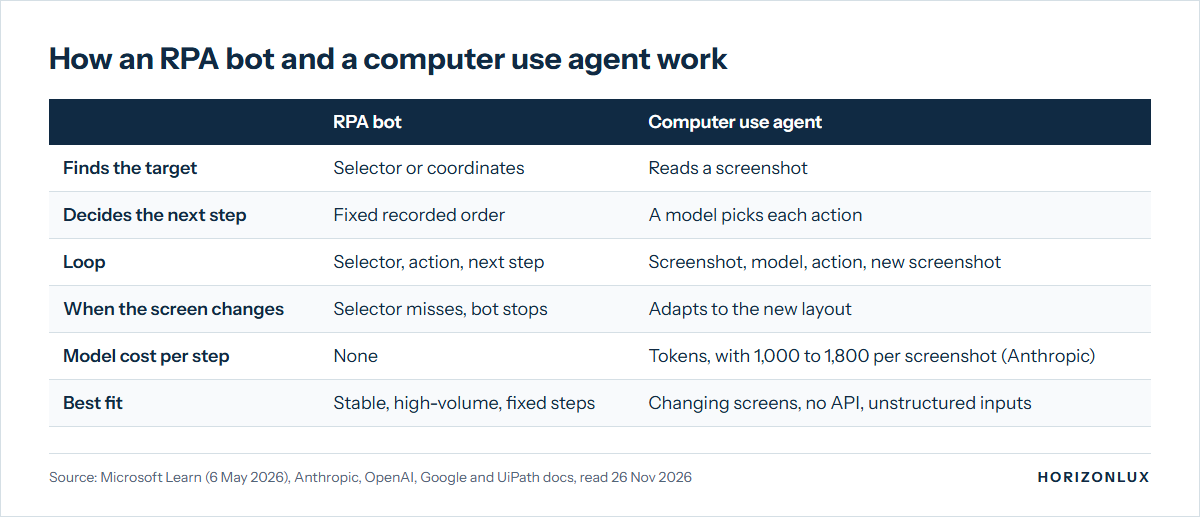
An RPA bot replays recorded steps. It finds a field by its selector, acts on it, and moves to the next step in a fixed order. When the screen changes, the selector misses and the bot stops.
A computer use agent works in a loop. It takes a screenshot, a model decides the next action, the agent clicks or types, and it takes a new screenshot to see what happened. It repeats until the task is done or it gives up.
Microsoft’s guide describes the shift as moving from step-based automation to outcome-based automation. The four main vendors now ship this loop in different shapes:
- Anthropic: the computer use toolset (
computer_toolset_20260801) gives Claude 17 member tools, such asscreenshot,left_click,typeandzoom. Anthropic’s docs say each screenshot adds roughly 1,000 to 1,800 input tokens. - OpenAI: the computer use guide offers a ComputerToolset, a BrowserToolset and a code-execution pattern, where the model writes code that drives the interface. OpenAI recommends code execution for GPT-6 Astra.
- Google: Gemini computer use runs in a browser, on a desktop or in an Android environment, and each response can carry a
safety_decisionfor the proposed action. - UiPath: ScreenPlay lists UiPath Screen Agent and Anthropic Computer Use among its models, and you can bring your own model instead.
 Source: Anthropic, OpenAI, Google and UiPath documentation, read 26 Nov 2026. Chart by HorizonLux.
What the benchmarks say, and what they do not
Agents still fail long tasks often. If you replace a bot with an agent, you also take on the job of supervising it.
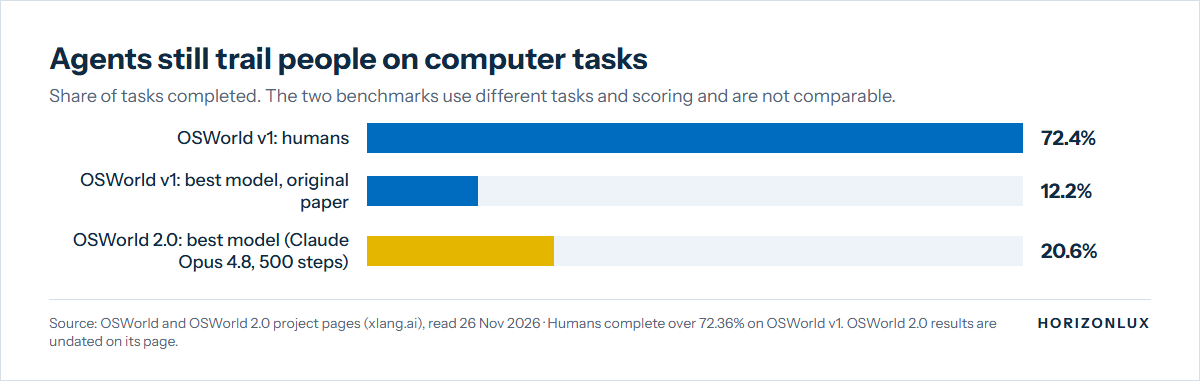
The original OSWorld benchmark has 369 computer tasks in real web and desktop apps. Humans complete over 72.36% of them. The best model in the original paper reached 12.24%.
OSWorld 2.0 is harder on purpose. It has 108 long-horizon workflows, and 69.6% of them take skilled users more than an hour. Its page names Claude Opus 4.8 as the best model, completing 20.6% of tasks at 500 steps under the binary-completion metric. The page does not date these results.
 Source: OSWorld (xlang.ai) and OSWorld 2.0 project pages, read 26 Nov 2026. Chart by HorizonLux.
The two benchmarks are not comparable. They use different tasks and different scoring, so 20.6% is not “better” than 12.24% in any simple sense. What both show is a wide gap between people and models on long, open-ended computer work.
We have left out OSWorld-Verified scores. The official leaderboard did not load when we checked, and third-party lists disagree on who leads.
The only head-to-head study: UiPath vs Anthropic computer use
One published study compares the two directly. Průcha, Matoušková and Strnad ran three tasks from rpachallenge.com in UiPath and in Anthropic’s computer use agent, and published the results as “Are LLM Agents the New RPA?” on arXiv (4 Sep 2025).
| Task | RPA time per run | Agent time per run | RPA successful runs | Agent successful runs | RPA build time | Agent build (prompting) time |
|---|---|---|---|---|---|---|
| Data entry (the RPA Challenge) | 139.8 s | not completed | 10 of 10 | 0 of 1 | about 40 min | not reported |
| Stock price monitoring | 53.9 s | 109.8 s | 10 of 10 | 9 of 10 | about 38 min | about 10 min |
| Invoice extraction | 20 s | 202.8 s | 10 of 10 | 6 of 10 | about 240 min | about 15 min |
Source: Průcha, Matoušková and Strnad, arXiv 2509.04198, Tables 1 and 4. Table by HorizonLux.
RPA was faster on both tasks the agent finished, and the authors found the speed gap statistically significant. The agent failed more runs, but with ten runs per task the authors could not show the reliability gap was significant.
The agent’s advantage was build time. On the monitoring and invoice tasks, prompting took about 10 and 15 minutes against about 38 and 240 minutes of UiPath development. Each build was timed once, by one developer, so treat those figures as a sign, not a measurement.
The authors’ conclusion is the useful part: the agent is not yet ready to replace RPA in mission-critical workflows, but it suits cases where fast setup and adaptability matter more than execution speed. They also put the cost of one invoice-extraction run at about $0.28.
When to keep the UiPath bot
Keep the bot when the screen is stable, the volume is high, the steps are fixed and the inputs are consistent. That is the profile Microsoft’s guide assigns to RPA: data entry, transaction processing and scheduled batch jobs with minimal exception handling.
UiPath says the same about its own product. Its computer use explainer says RPA “excels in stable, high-volume, and rules-driven processes”.
A bot that has run cleanly for a year on a screen nobody touches is not a migration candidate. Moving it to an agent makes every run slower and adds a model bill, with nothing gained.
When a computer use agent is the better tool
Use an agent when at least one of these is true:
- The screen changes often. Microsoft’s guide lists frequently changing UIs as a case for computer-using agents.
- There is no API. Legacy desktop apps are where screen-level automation is the only route.
- Inputs are unstructured. Scanned documents, emails and free-text fields vary from run to run.
- Exceptions need judgment. The agent can choose the next action from context instead of failing.
- The flow crosses several apps. Microsoft gives quote-to-cash across CRM, ERP and document stores as an example.
UiPath’s best practices name the specific trouble spots where ScreenPlay helps: brittle selectors, dynamic elements, popups, virtualized lists, embedded tables and custom controls. They also say UiPath’s Healing Agent, which repairs broken selectors, cannot absorb changes in the interaction itself, such as a new confirmation dialog or a reordered set of screens. Those are the steps to hand to an agent.
A five-question test for each workflow
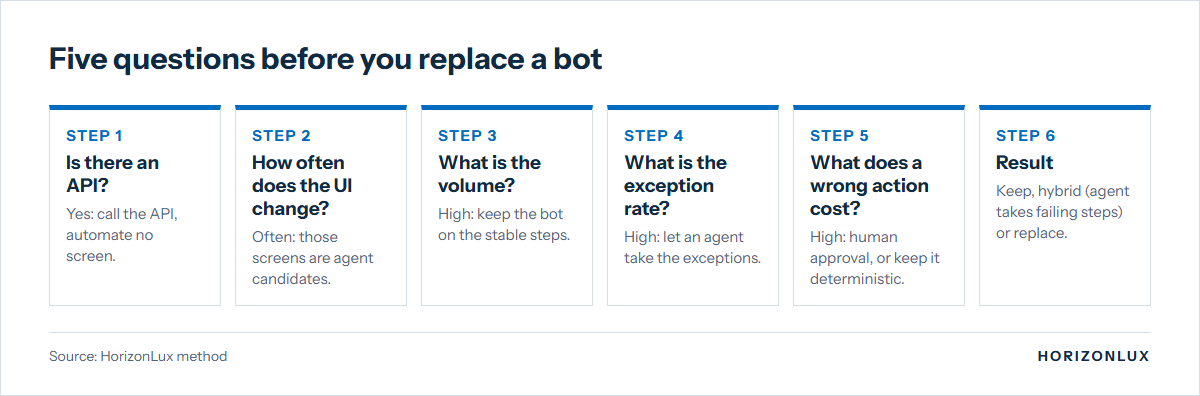
HorizonLux puts each bot through five questions before anyone touches it. This is our method, not a vendor standard:
- Is there an API? If the system has one, call it. Neither a bot nor an agent should click through a screen an API can reach.
- How often does the UI change? Rarely means keep. Often means the steps on that screen are agent candidates.
- What is the volume? High volume favours the bot, because every agent step costs time and tokens.
- What is the exception rate? If many runs end in a human queue, an agent can take the exceptions while the bot keeps the happy path.
- What does a wrong action cost? If a mistake moves money or deletes records, the agent needs a human approval on that step, or the step stays deterministic.
Most bots end up in the middle answer: hybrid. The bot keeps every stable step, and the agent takes only the screens that keep breaking. Replace the whole bot only when most of its steps fail the test.
 Source: HorizonLux method, based on the Microsoft and UiPath guidance above. Chart by HorizonLux.
If you are weighing which platform should run the deterministic part, our automation platform picker compares the options side by side.
Risk controls the vendors require
All three model vendors tell you to isolate the agent, limit what it can reach and confirm consequential actions.
- Anthropic recommends a dedicated virtual machine or container with minimal privileges, an allowlist of domains, and a human to confirm decisions with real-world consequences. Its docs warn that Claude may follow instructions found in on-screen content, which is prompt injection.
- OpenAI says to treat screen content as untrusted, ask for approval before making changes, and set step, time or cost limits on each run.
- Google recommends a sandboxed VM or container. Gemini flags risky actions as
require_confirmation, which means your app must ask the user, and its prompt-injection detection is opt-in and off by default.
An RPA bot cannot be talked into anything, because it does not read the screen for meaning. An agent can. That is why injection matters more here than in classic RPA. Our post on context poisoning covers how hostile text reaches an agent and how to contain it.
What it costs to run
An agent pays for model tokens on every step. A deterministic step pays nothing beyond the machine it runs on.
Screenshots make this worse. Anthropic’s docs put each screenshot at roughly 1,000 to 1,800 input tokens, and a long loop keeps sending them. UiPath’s best practices make the same point from the other side: every step that can be expressed deterministically is a step that costs no model call.
We have not compared UiPath licence prices, because UiPath does not publish them. What you can estimate is the agent side. Our guide to AI agent costs explains why a run’s cost grows with its step count, and the agent cost estimator turns your step count and model into a monthly figure.
Where to start
Pick the one bot that breaks most often. Run it through the five questions, move only its failing screens to an agent, and keep the rest of the flow as it is. Measure the agent’s success rate and cost per run for a month before you migrate anything else.
If you want help with that first pilot, our AI agent development team builds hybrid flows like this inside your own systems. You can also hire an AI engineer to work on your backlog directly, from $3,000/month, starting within ten working days, with a paid pilot first.
Frequently asked questions
Can a computer use agent replace UiPath completely?
Not for most estates today. In the only head-to-head study, UiPath was faster on every task the agent finished and succeeded on all 30 runs, while the agent failed several. Microsoft and UiPath both recommend a hybrid: keep RPA for stable, high-volume steps and use an agent for the screens that change or need judgment.
Is computer use the same as agentic automation?
Computer use is one kind of agentic automation. It means a model operates software through screenshots, clicks and typing, like a person at a keyboard. Agentic automation is broader: an agent can also call APIs, run code or query databases. Use computer use only where no API or structured route exists.
Does UiPath support Claude or OpenAI computer use models?
Yes. UiPath’s ScreenPlay documentation lists Anthropic Computer Use and OpenAI Operator among its model options, alongside UiPath Screen Agent. You can also bring your own model through UiPath’s AI Trust Layer. Check the documentation for your deployment, because the model list differs between Automation Cloud and Automation Suite.
How reliable are computer use agents in 2026?
Not reliable enough to run long tasks unattended. On OSWorld 2.0, whose tasks mostly take skilled people over an hour, the best model named on the project page completes 20.6% of tasks. Short, well-scoped steps do much better, which is why the hybrid pattern gives the agent only the steps that need it.
Is computer use safe to run on production systems?
Only with controls in place. Anthropic, OpenAI and Google all recommend an isolated VM or container, limits on what the agent can reach, and human approval for consequential actions. Treat everything on screen as untrusted, because text on a page can carry prompt injection. Start with read-only steps before you allow writes.
Should we use an API instead of computer use?
Yes, whenever one exists. An API call is faster, cheaper and more predictable than any screen-based method, whether a bot or an agent. Computer use is for legacy apps, vendor portals and desktop software that offer no API. Check for an API before you automate any screen.
Sources
- UiPath, “ScreenPlay best practices”, no date shown, read 26 Nov 2026. https://docs.uipath.com/agents/automation-cloud/latest/user-guide-screenplay/best-practices
- UiPath, “Installing ScreenPlay” (model options), no date shown, read 26 Nov 2026. https://docs.uipath.com/agents/automation-cloud/latest/user-guide-screenplay/installing-screenplay
- UiPath, “What is computer use?”, undated, read 26 Nov 2026. https://www.uipath.com/ai/what-is-computer-use
- Microsoft Learn, “When to use Windows 365 for computer-using agents (CUA) vs. robotic process automation (RPA)”, 6 May 2026. https://learn.microsoft.com/en-us/windows-365/agents/when-to-use-w365a
- Anthropic, “Computer use tool”, read 26 Nov 2026. https://platform.claude.com/docs/en/agents-and-tools/tool-use/computer-use-tool
- OpenAI, “Computer use” guide, no date shown, read 26 Nov 2026. https://developers.openai.com/api/docs/guides/tools-computer-use
- Google, “Computer use” (Gemini API), no date shown, read 26 Nov 2026. https://aistudio.google.com/docs/computer-use
- XLANG Lab, “OSWorld”, project page, read 26 Nov 2026. https://osworld-v1.xlang.ai/
- XLANG Lab, “OSWorld 2.0”, project page, results undated, read 26 Nov 2026. https://osworld-v2.xlang.ai/
- Průcha, Matoušková and Strnad, “Are LLM Agents the New RPA? A Comparative Study with RPA Across Enterprise Workflows”, arXiv 2509.04198, 4 Sep 2025. https://arxiv.org/abs/2509.04198v1
Gaps: volume and KD are pending. OSWorld-Verified top scores are left out because the official leaderboard did not load. UiPath licence prices are not public, so no RPA cost comparison is made. The arXiv paper was read in full on 26 Nov 2026; its build times are single measurements by one developer.