
On a Claude Team or Enterprise plan, Claude Code comes with the seat: Anthropic’s help center says “Claude Code is included with every Team plan seat.” Your work as an admin is to choose seat tiers, push one managed settings policy, and turn on spend limits and analytics before you widen access.
This checklist follows Anthropic’s own admin setup guide in the order the decisions come up. Every setting name below is quoted exactly as the docs write it.
Pick the plan and the seats
Anthropic’s default recommendation is a Claude for Teams or Enterprise plan. Its admin guide says to choose it when “You want Claude Code and claude.ai under one per-seat subscription with no infrastructure to run.”
The other routes bill per token instead. The Claude Console suits API-first teams that want pay-as-you-go billing, while Amazon Bedrock, Google Cloud’s Agent Platform and Microsoft Foundry let you keep your existing cloud’s compliance controls and billing.
On the Team plan, a standard seat costs $25 a month billed monthly or $20 billed annually, per Claude’s pricing page on 26 November 2026. A premium seat costs $125 monthly or $100 annually and gives “5x more usage than standard seats”.
Enterprise costs “US$20/seat/month, billed annually, 20 seat minimum”, plus usage billed at API rates, per the same page. Anthropic describes the standard Team seat only as “more usage than Pro” and publishes no number for it.
Three details catch admins out:
- Seat usage is shared. Each member’s allowance resets on a rolling five-hour window and a weekly window, and it is shared with Claude chat and Cowork, per Anthropic’s costs page.
- API credits do not count. “Monthly API credits included with Team plans can’t be used in Claude Code or the Claude apps”, per the help center.
- Some features need a claude.ai account. Cloud sessions, cloud scheduled tasks, Code Review, Remote Control and the Chrome extension “aren’t available through Console API keys or cloud-provider credentials alone”, per the admin guide.
 Source: Anthropic, Claude Code “Manage costs effectively”, read 26 Nov 2026. Chart by HorizonLux.
Get settings onto every machine
Managed settings sit above every developer’s own settings, so one policy sets the floor for everyone. Anthropic’s managed settings page says no user, project, local or --settings value overrides them, apart from a few security-sensitive exceptions.
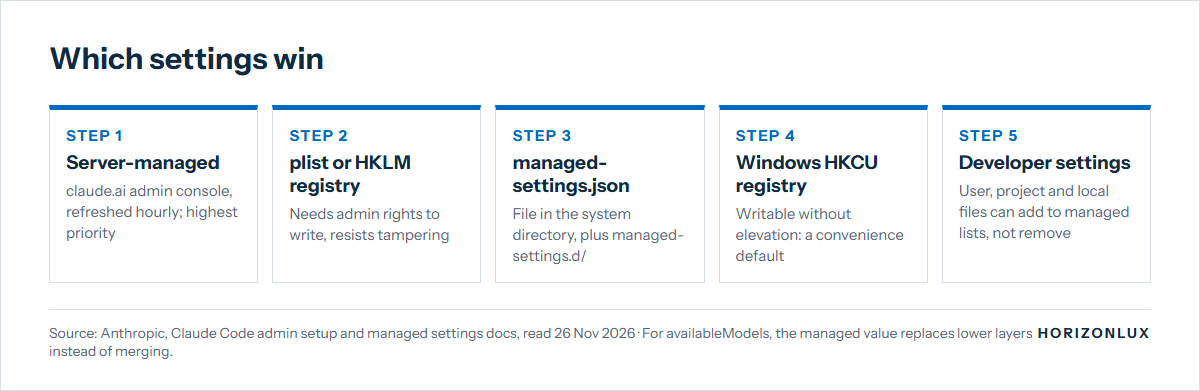
Claude Code checks four managed sources, highest priority first:
- Server-managed, from the claude.ai admin console. It is fetched at startup and refreshed hourly, and needs a Team or Enterprise plan.
- plist or registry policy: the
com.anthropic.claudecodeplist on macOS, orHKLM\SOFTWARE\Policies\ClaudeCodeon Windows. - File-based
managed-settings.json. - Windows user registry at
HKCU\SOFTWARE\Policies\ClaudeCode. Any user can write it without admin rights, so Anthropic says to treat it “as a convenience default rather than an enforcement channel.”
The file paths for managed-settings.json are:
- macOS:
/Library/Application Support/ClaudeCode/managed-settings.json - Linux and WSL:
/etc/claude-code/managed-settings.json - Windows:
C:\Program Files\ClaudeCode\managed-settings.json
If several teams own parts of one policy, put each part in its own file in a managed-settings.d/ folder next to managed-settings.json. Claude Code merges them, so no one has to edit a shared file.
To check it worked, have a developer run /status inside Claude Code. The Setting sources line should show Enterprise managed settings, with the winning source in brackets.
 Source: Anthropic, Claude Code admin setup and managed settings docs, read 26 Nov 2026. Chart by HorizonLux.
One merge rule matters. List settings such as permissions.allow and permissions.deny merge entries from lower levels into the managed list, “so developers can extend managed lists but not remove from them”, per the admin guide. For availableModels, the managed value replaces the lower layers instead.
For how this looks from the developer’s side, see Day 20 of our Challenge, on settings.
The permission settings to lock first
Five controls cover most of the risk. All five are listed in the “Decide what to enforce” table of Anthropic’s admin guide.
- Deny rules, with
permissions.deny, for commands and files nobody should touch, such as.envfiles. - Managed-only rules, with
allowManagedPermissionRulesOnly, which makes managed settings the only source of permission rules. - No bypass mode, with
permissions.disableBypassPermissionsModeset to"disable", which stops--dangerously-skip-permissions. - Sandboxed Bash, with
sandbox.enabledand a domain list insandbox.network.allowedDomains. - An MCP allowlist, with
allowedMcpServers,deniedMcpServersorallowManagedMcpServersOnly.
The sandbox is the one teams skip, and it is the one that matters most. Denying WebFetch blocks Claude’s fetch tool, but if Bash is allowed, curl and wget can still reach any URL. Anthropic’s guide says “Sandboxing closes that gap with a network domain allowlist enforced at the OS level.”
A minimal starting policy, built only from keys on Anthropic’s admin and permissions pages:
{
  "permissions": {
    "deny": [
      "Read(./.env)",
      "Read(./secrets/**)",
      "Bash(git push *)"
    ],
    "disableBypassPermissionsMode": "disable"
  },
  "allowManagedPermissionRulesOnly": true,
  "sandbox": {
    "enabled": true,
    "network": {
      "allowedDomains": ["github.com", "registry.npmjs.org"]
    }
  }
}
Change the domain list to the hosts your team actually needs. With allowManagedPermissionRulesOnly on, developers’ own allow rules stop applying, so add the allow rules your team needs to the managed file, or leave that key off for the pilot.
Other keys worth a look once the basics work: allowManagedHooksOnly restricts which hooks run, forceLoginOrgUUID keeps claude.ai logins inside your organization, availableModels limits the model picker, and maxEffortLevel caps the effort level.
The Challenge covers the developer side of each control: permissions on Day 9, the sandbox on Day 10 and MCP for teams on Day 17. For the risks of connecting MCP servers, read our post on MCP OAuth security.
Control what it costs
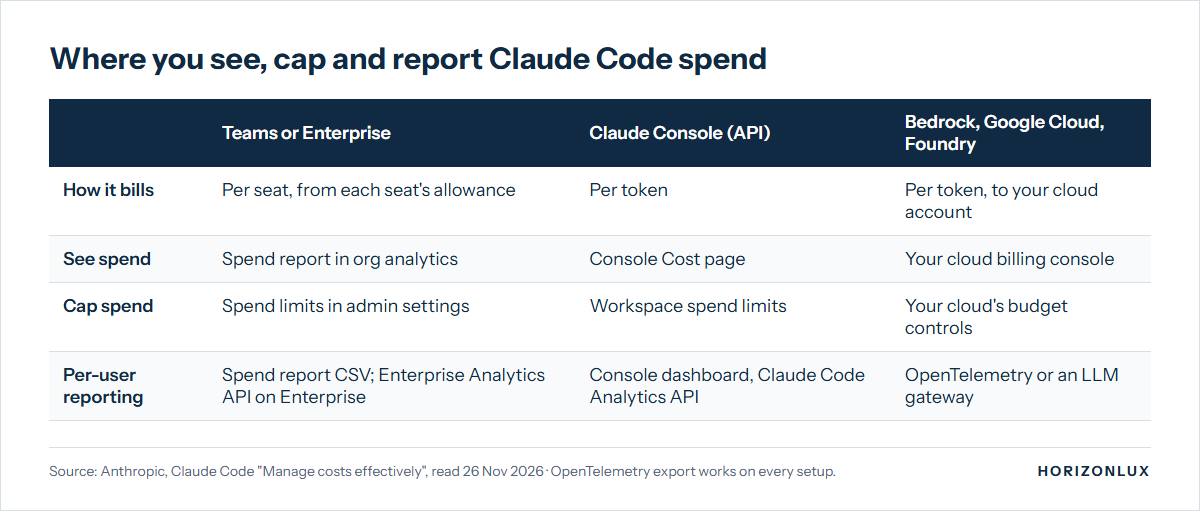
On Team and Enterprise, the seat allowance is the ceiling by default. To let people go past it, turn on usage credits and set spend limits “at the organization, group, or individual member level”, per Anthropic’s costs page. You set them under Organization settings > Usage.
Anthropic gives one planning figure for enterprise deployments. Its costs page says “the average cost is around $13 per developer per active day and $150-250 per developer per month, with costs remaining below $30 per active day for 90% of users.” That is Anthropic’s own average, not a quote for your team.
The same page says to “start with a small pilot group” and set a baseline before wider rollout. That is the rollout plan below.
Agent teams cost more. Anthropic says they use “approximately 7x more tokens than standard sessions when teammates run in plan mode”, because each teammate keeps its own context window. They are off by default, so leave them off for the pilot.
The tools you get depend on your setup:
- Team and Enterprise: a spend report in org analytics with per-user CSV export, and on Enterprise, the Enterprise Analytics API.
- Contracted rates: the
modelPricingmanaged setting makes cost figures in/usagematch your contract, from Claude Code v2.1.242. It changes what Claude Code reports, not what Anthropic charges. - Console: workspace spend limits and a workspace rate limit for the auto-created “Claude Code” workspace.
- Every setup: OpenTelemetry export, the only option Anthropic says streams per-user token and cost metrics into your own stack in near real time. An LLM gateway also works; we compare two in OpenRouter vs LiteLLM.
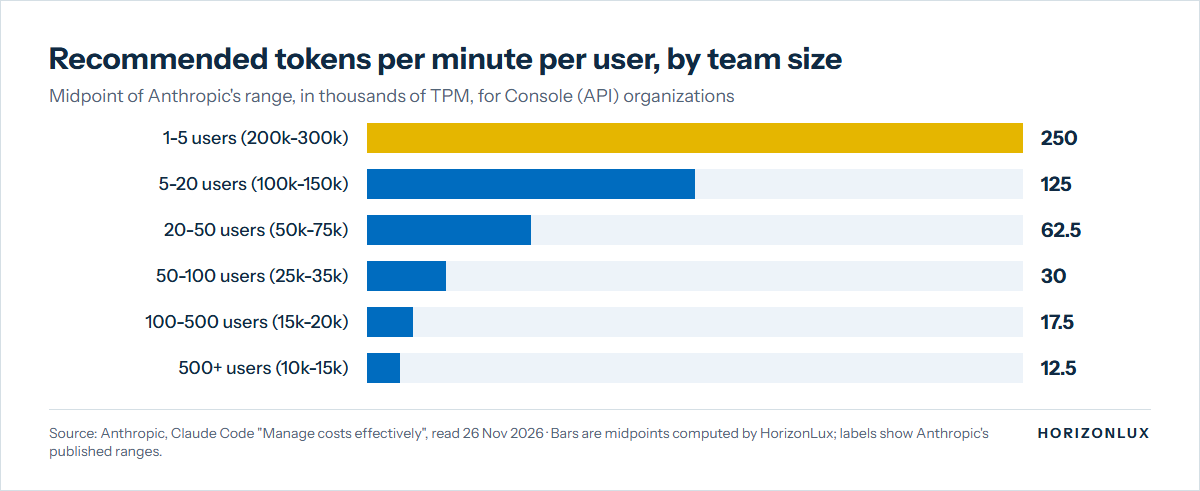
For Console (API) organizations, Anthropic recommends per-user token-per-minute limits that shrink as the team grows, because fewer people use Claude Code at the same moment in a large group. A team of 1 to 5 gets 200k to 300k TPM per user, and a team of over 500 gets 10k to 15k.
 Source: Anthropic, Claude Code “Manage costs effectively”, read 26 Nov 2026. Chart by HorizonLux.
To model seat and usage costs for your own headcount, try the AI team cost calculator. Our guides on how to reduce your OpenAI and Anthropic bill and on prompt caching cover the habits that keep usage down.
Roll it out in three steps
Pilot first, measure, then widen. This follows Anthropic’s advice to start small and set a baseline.
- Pilot. Give a small group seats, with the managed policy in place and analytics on. Confirm
/statusshows the managed source on every pilot machine. - Review after two weeks. Open the analytics dashboard, which shows daily active users, sessions and contribution metrics, and read the spend report beside it. Fix any rules that blocked real work.
- Widen. Add seats in waves. Commit a shared
CLAUDE.mdand.mcp.jsonto each repo so every developer starts from the same rules. Share Anthropic’s quickstart and our Day 27 lesson on models and usage.
If a developer sees “You haven’t been added to your organization yet”, their seat does not include Claude Code access, and you update it in the admin console, per the admin guide.
If you want engineers to set this up with your team and commit tested rules to your repos, HorizonLux runs AI workshops. You can also hire an AI engineer to own the rollout, from $3,000/month with a paid pilot first. For choosing between Claude Code and other tools in the first place, see Claude Code vs Cursor vs Codex.
Frequently asked questions
Is Claude Code included in the Claude Team plan?
Yes. Anthropic’s help center says “Claude Code is included with every Team plan seat.” Usage comes out of each seat’s allowance, which is shared with Claude chat and Cowork and resets on a five-hour and a weekly window.
How much does Claude Code cost per developer?
On Team, the seat price covers it: $20 to $25 a month for a standard seat on 26 November 2026. On per-token billing, Anthropic reports an average of about $13 per active day and $150 to $250 a month across enterprise deployments.
Can admins stop developers from skipping permission prompts?
Yes. Set permissions.disableBypassPermissionsMode to "disable" in managed settings. That turns off --dangerously-skip-permissions, and because it is managed, developers cannot override it.
Where does the managed settings file go?
On macOS, /Library/Application Support/ClaudeCode/managed-settings.json. On Linux and WSL, /etc/claude-code/managed-settings.json. On Windows, C:\Program Files\ClaudeCode\managed-settings.json. Policy files for several teams can go in a managed-settings.d/ folder beside it.
Can we limit which MCP servers people connect?
Yes. Managed settings support allowedMcpServers, deniedMcpServers and allowManagedMcpServersOnly, or a deployed managed-mcp.json file, per Anthropic’s admin setup guide.
What is the difference between standard and premium Team seats?
A premium seat gives “5x more usage than standard seats”. It costs $100 a month billed annually or $125 monthly, against $20 or $25 for a standard seat, per Claude’s pricing page on 26 November 2026.
Sources
- Anthropic, “Set up Claude Code for your organization”, read 26 Nov 2026, https://code.claude.com/docs/en/admin-setup
- Anthropic, “Deploy managed settings”, read 26 Nov 2026, https://code.claude.com/docs/en/managed-settings
- Anthropic, “Configure permissions”, read 26 Nov 2026, https://code.claude.com/docs/en/permissions
- Anthropic, “Manage costs effectively”, read 26 Nov 2026, https://code.claude.com/docs/en/costs
- Anthropic, “Use Claude Code with your Team or Enterprise plan”, “Updated over 3 weeks ago”, read 26 Nov 2026, https://support.claude.com/en/articles/11845131-use-claude-code-with-your-team-or-enterprise-plan
- Anthropic, “Plans and pricing”, no date on page, read 26 Nov 2026, https://claude.com/pricing
Gaps and changes after re-reading: the TPM-per-user table sits under the Console section of the costs page, so the post labels it as a Console recommendation. The standard Team seat allowance has no published number. No independent survey of team rollout outcomes was found, so none is used. The outline’s fourth graphic (rollout timeline) is a numbered list in the text, to stay within three graphics.