
To fix a vibe coded app, freeze changes, then work through the same few places these apps keep failing: database access rules, auth on side endpoints, secrets in the browser, unescaped output and client-side payment checks. Run the checklist below in order, because the published leaks almost all started with data access.
TL;DR and key takeaways
- The failures repeat. Published incidents on vibe coding platforms are missing database rules, unprotected endpoints and exposed secrets, not exotic attacks.
- AI-written code fails security tests often. Controlled studies keep finding a large share of it insecure, and people using an assistant tend to trust it more than they should.
- Order matters. Freeze and back up, fix data access, then auth, secrets, output, payments, dependencies and review.
- Fix or rebuild depends on whether the data model is sound. Configuration gaps can be fixed. Auth tangled through the UI usually means a rebuild.
Why AI-written code fails security checks
Controlled studies keep finding that a large share of AI-generated code is insecure, and that people using the assistant tend to think it is fine.
Veracode’s study, published 30 July 2025, ran 80 coding tasks across more than 100 large language models. In 45% of test cases, the code contained a flaw from the OWASP Top 10.
The rates were worse for some weaknesses. In the same study, the models failed to defend against cross-site scripting (CWE-80) in 86% of cases and against log injection (CWE-117) in 88%. Java was the riskiest language, with a failure rate above 70%, while Python, C# and JavaScript sat between 38% and 45%.
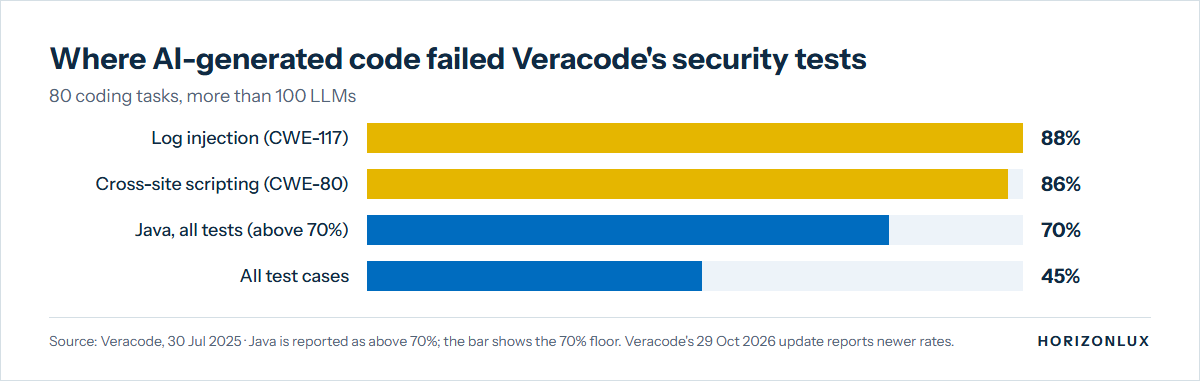 Source: Veracode, GenAI Code Security Report, 30 Jul 2025. Chart by HorizonLux.
Veracode has published later editions since. Its update of 29 October 2026 reports the first meaningful gain since the series began, while cross-site scripting and log injection still fail in most cases. The checklist below holds either way.
The academic work points the same way. Pearce and co-authors (IEEE Symposium on Security and Privacy, 2022) had GitHub Copilot complete 1,689 programs across 89 scenarios, and about 40% were vulnerable.
Perry and co-authors (ACM CCS 2023) found that participants with an AI assistant wrote insecure solutions more often on four of five tasks. They were also more likely to believe their code was secure. That second finding is the reason a checklist matters: the app feels done before it is safe.
Vendor research adds a live-code view. CodeRabbit, which sells AI code review, reported on 17 December 2025 that across 470 open-source pull requests, those co-authored by AI averaged 10.83 issues against 6.45 for human-only ones, with security issues 1.57 times as common.
What it looks like in a live app
The published incidents on vibe coding platforms are configuration and auth gaps.
Missing database rules on Lovable. Matt Palmer’s statement on CVE-2025-48757 says that of 1,645 Lovable projects checked, 170 (about 10.3%) had inadequate row-level security, with 303 exposed endpoints. His team could also write a record that marked a payment as “paid”. The issue was found on 20 March 2025, reported on 21 March, and the CVE was published on 29 May 2025.
Auth gaps on Base44. Wiz Research disclosed on 29 July 2025 that Base44’s registration and one-time password endpoints needed only an app’s public ID. Anyone could create a verified account on private apps that were meant to be single sign-on only. Wiz reported it on 9 July, and Base44 fixed it within about 24 hours.
Exposed secrets at scale. Escape’s scan, published 29 October 2025 and updated 17 June 2026, covered more than 5,600 public apps built on Lovable, Base44, Create.xyz, Vibe Studio and Bolt.new. It found more than 2,000 vulnerabilities, over 400 exposed secrets and 175 instances of exposed personal data.
None of these needed a clever attacker. They needed someone to look.
The checklist, in the order to run it
Freeze first, then fix data access, because that is where the published leaks came from.
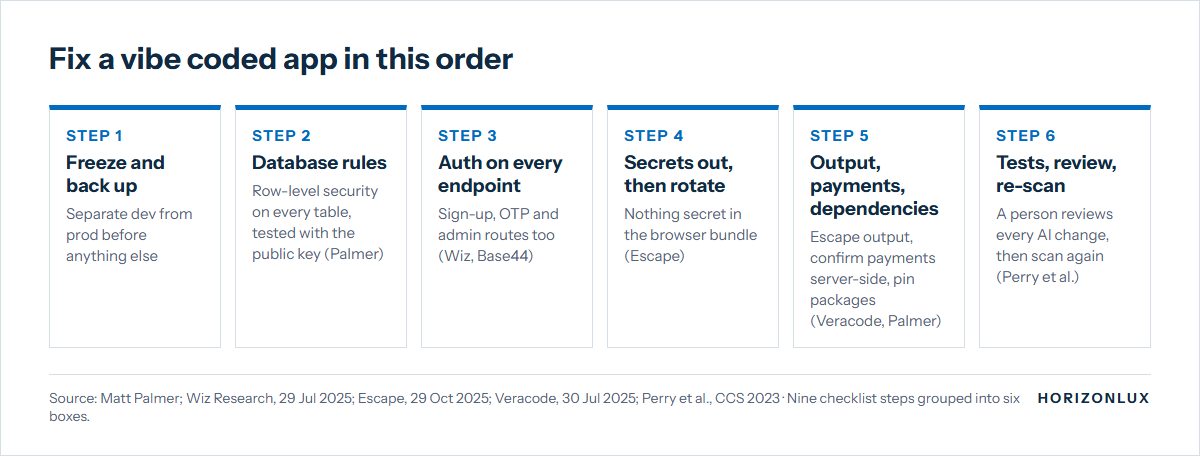 Source: Matt Palmer (CVE-2025-48757), Wiz Research (29 Jul 2025), Escape (29 Oct 2025), Veracode (30 Jul 2025), Perry et al. (CCS 2023). Chart by HorizonLux.
1. Freeze changes and back up
Stop shipping new features until the checklist is done, and take a backup you have restored at least once. Then separate development from production, with different databases and different keys. An agent or a teammate working against production is how data gets lost: see the Replit case in our roundup of AI agent security incidents.
2. Turn on row-level security for every table, and test it with the public key
Palmer’s findings came from tables that the public key could read or write. In Supabase-backed apps, turn on row-level security for every table, then write a policy for each one that limits rows to their owner or role.
Test it the way an outsider would. Sign in as a normal user, or use only the public key, and confirm you cannot read or change another user’s rows. A policy you have not tested is a guess.
3. Put auth on every endpoint, including sign-up, OTP and admin routes
The Base44 flaw was in side endpoints, not the main login. List every route and function your app exposes, including registration, password reset, one-time passwords, webhooks and admin pages. Check that each one verifies who is calling and what they are allowed to do, on the server.
4. Get secrets out of the browser bundle, then rotate them
Escape found hundreds of secrets in public apps. Search your built front-end code for API keys, service-role keys and tokens. Anything a browser can download, an attacker can read.
Move each secret to a server-side function or environment variable, then rotate it. A key that was exposed stays exposed until you replace it, even after you remove it from the code.
5. Escape output and validate input
Veracode’s 86% failure rate on cross-site scripting and 88% on log injection say where AI-written code is weakest. Use your framework’s built-in escaping, never insert raw HTML from user data, and strip line breaks and control characters before user input reaches a log. Validate input on the server, not just in the form.
6. Confirm payments on the server, never from a client field
Palmer’s team could mark a payment as “paid” by writing a record. Payment status should only change when your server confirms it with the payment provider, usually through a signed webhook. The client should never be able to write that field.
7. Pin dependencies and review what the AI added
AI builders add packages freely. List every dependency, remove the ones you do not use, pin versions, and check each new one before it ships. The supply chain section of the same incidents roundup shows how a trusted package can turn malicious in a single release.
8. Add tests, then review every AI change before merge
Perry’s study is the warning here: people using AI assistants were more confident in less secure code. Write tests for the rules above (who can read what, who can pay, who can sign up), and have a person review every AI-written change before it merges.
That review step is where many teams now get stuck, which is the subject of our post on the AI code review bottleneck. For a hands-on version, Day 45 of our Claude Code Challenge runs a bug and security review inside Claude Code.
9. Re-scan
When the fixes are in, scan the app again from the outside, with the public key and an ordinary account. Repeat it after each large change.
Fix or rebuild?
Fix the app when the data model is sound and the problems are configuration: missing policies, exposed keys, an unprotected endpoint. Those are real but contained, and the checklist above covers them.
Rebuild when auth and data access are tangled through the UI. If permission checks live in front-end components, tables have no clear owner, and every screen talks to the database directly, patching will keep missing cases. A rebuild with a proper server layer is often cheaper than chasing them. That is the kind of work our custom software development team takes on.
Either way, the code should end up in your own repository, with tests and docs, so the next change does not start from zero.
Need a hand with the fix?
HorizonLux can run this checklist on your app and do the fix, with the code, IP and docs in your repo from day one. We move AI-built prototypes into production code as part of our Next.js AI applications work, starting with a paid pilot you can stop. If you would rather have an engineer on your backlog, you can also hire an AI engineer.
Frequently asked questions
Is AI-generated code less secure than human code?
Studies say it often is. Veracode found OWASP Top 10 flaws in 45% of AI-generated test cases in July 2025, and Perry and co-authors found people using an assistant wrote insecure code more often while feeling more confident about it. Review AI code at least as carefully as human code.
How do I check row-level security in a Lovable or Supabase app?
Confirm row-level security is on for every table, then read each policy. Test from the outside: sign in as an ordinary user, or use only the public key, and try to read or change another user’s rows. If you can, the policy is wrong.
Should I fix or rebuild a vibe coded app?
Fix it when the data model is sound and the gaps are configuration, such as missing policies or exposed keys. Rebuild when permission checks live in the front end and screens talk to the database directly, because patches will keep missing cases.
Can I ask the AI to fix its own security bugs?
You can use it to help, but do not let it be the check. Perry and co-authors found people using AI assistants were more confident in less secure code. Have the AI propose fixes, then test them and have a person review every change before merge.
What does it cost to fix a vibe coded app?
We found no published market figure we trust. At HorizonLux, an embedded engineer starts from $3,000/month, after a paid pilot that is priced on its own and that you can stop. The exact price is agreed on a free call.
Sources
- Veracode, “AI-generated code poses major security risks in nearly half of all development tasks”, 30 Jul 2025, https://www.veracode.com/press-release/ai-generated-code-poses-major-security-risks-in-nearly-half-of-all-development-tasks-veracode-research-reveals/
- Veracode, GenAI Code Security update (first meaningful gain since 2025), 29 Oct 2026, https://www.veracode.com/?p=33104
- Pearce et al., “Asleep at the keyboard? Assessing the security of GitHub Copilot’s code contributions”, IEEE S&P 2022, https://arxiv.org/abs/2108.09293
- Perry et al., “Do users write more insecure code with AI assistants?”, ACM CCS 2023, https://arxiv.org/abs/2211.03622
- CodeRabbit, AI vs human code generation report, 17 Dec 2025 (vendor research), https://www.coderabbit.ai/blog/state-of-ai-vs-human-code-generation-report
- Matt Palmer, “Statement on CVE-2025-48757”, 2025, https://mattpalmer.io/posts/statement-on-CVE-2025-48757/
- Wiz Research, critical vulnerability in Base44, 29 Jul 2025, https://www.wiz.io/blog/critical-vulnerability-base44
- Escape, methodology and findings of its vibe coded app scan, 29 Oct 2025, updated 17 Jun 2026, https://escape.tech/blog/methodology-how-we-discovered-vulnerabilities-apps-built-with-vibe-coding/
Notes on sources:
- Veracode figures (45%, 86%, 88%, above 70%, 38% to 45%) were re-read on 26 Nov 2026 in the 30 Jul 2025 release and hold. Veracode’s 29 Oct 2026 update reports different, newer rates (overall vulnerable code down to 38%; pass rates of 18% on cross-site scripting and 13% on log injection). Those are not in the approved outline, so the post mentions the update in words only. The owner may want to swap the chart to the 2026 figures.
- No primary, dated figure for the cost or time to fix a vibe coded app was found, so none is given.